What if you could send a text message when the cellular network was unavailable, overloaded, or completely out of range? A Meshtastic mesh radio makes that possible by pairing low-power LoRa radio hardware with open-source software.
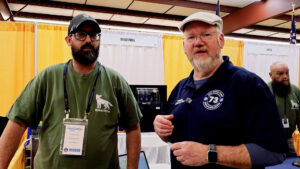
At Orlando HamCation 2026, Ham Radio Prep lead instructor Jim, N4BFR, spoke with Matt, KN4MMA, from MakerNova about how Meshtastic works, why it interests amateur radio operators, and which devices make sense for different users.
The short version is simple: your phone can connect to a nearby Meshtastic node over Bluetooth. The node sends your text over radio. Other compatible nodes can relay the packet across the mesh until it reaches its destination—all without using a cell tower or the public internet.
What Is Meshtastic?
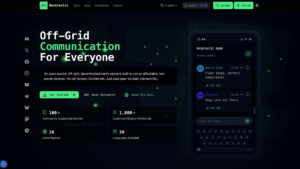
Meshtastic is an open-source, decentralized communication platform designed for affordable, low-power LoRa devices. It supports text messaging and other small data packets over a peer-to-peer radio network.
Unlike ordinary SMS, a Meshtastic message does not travel through a cellular provider. Unlike an internet messaging app, it does not require Wi-Fi or an online server for basic local mesh communication. Each compatible radio becomes a node, and eligible nodes can help relay traffic for others.
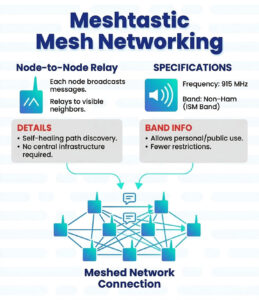
Meshtastic is not conventional amateur radio. In the United States, compatible devices generally use the unlicensed 902–928 MHz ISM allocation with the appropriate regional configuration. Users must select the correct region and follow the power, duty-cycle, and frequency rules that apply where they operate. A ham radio license is not normally required simply to use Meshtastic on the applicable license-free allocation.
That accessibility is one reason the platform has attracted hams, emergency-preparedness groups, hikers, event teams, makers, and neighborhood communication projects.
How Does a Meshtastic Message Travel?
-
- Write the message. Compose a short text in a Meshtastic client on your phone, tablet, computer, or compatible standalone device.
- Connect to your node. A phone commonly sends the message to a nearby radio node over Bluetooth. Some devices can also connect by USB, Wi-Fi, or their own keyboard and screen.
- Transmit over LoRa. The node converts the message into a small radio packet and transmits it using its configured LoRa region and modem preset.
- Relay through the mesh. Nearby nodes may rebroadcast the packet within the configured hop limit, extending communication beyond a single direct radio link.
Think of a drop landing in a pond: the effect can move outward through several points. Coverage still depends on node placement, terrain, antennas, configuration, congestion, and whether a useful path exists.
Why Are Ham Radio Operators Interested?
Meshtastic does not replace an amateur radio station, but it adds a useful low-bandwidth tool to the communication kit.
- Off-Grid Text Without a Cellular Subscription
The mesh can exchange local messages without cellular service or internet infrastructure. That can be useful during outdoor activities, planned events, neighborhood exercises, and grid-down practice.
- Communication With Unlicensed Family and Friends
Because operation uses the appropriate license-free allocation rather than an amateur band, properly configured devices can be used by people who do not hold amateur radio licenses. That makes the technology interesting for families and mixed groups.
- A Hands-On Technical Project
Meshtastic is open source. Users can experiment with hardware, antennas, batteries, enclosures, GPS modules, solar-powered nodes, software integrations, and network design. It offers many of the same maker instincts that draw people to amateur radio.
- A Complementary Communication Layer
Voice radio remains better for fast, interactive conversation. Meshtastic is designed around short data packets. It can provide quiet text messaging, position data when enabled, and store-and-forward-style opportunities when direct voice communication is inconvenient.
Meshtastic Devices Discussed at Orlando HamCation
MakerNova focuses on making supported boards portable and field-ready through cases, batteries, antennas, and carrying options. During the interview, Matt demonstrated several device styles.
Heltec V3: A Compact Phone-Connected Node
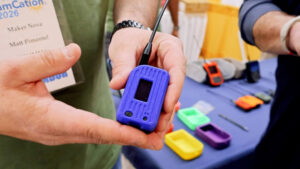
The Heltec V3 is a small ESP32-S3-based LoRa board supported by Meshtastic. In the demonstration, MakerNova paired it with a 2,000 mAh battery and a portable enclosure.
For normal messaging, the user installs the Meshtastic app, connects the phone to the node by Bluetooth, and types messages in an interface that feels similar to a regular messaging app. The phone provides the screen and keyboard; the node handles the LoRa radio link.
LILYGO T-Deck: Messaging Without Relying on a Phone
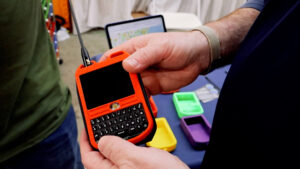
The T-Deck combines a touchscreen, physical keyboard, and LoRa hardware in a handheld form that resembles an older BlackBerry-style communicator. Its appeal is independence from a phone for basic operation. A self-contained keyboard can be helpful when working at an event or building a dedicated off-grid communication kit.
Heltec Mesh Node T114: Efficiency and Optional Capabilities
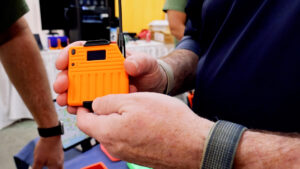
Different boards offer different balances of power consumption, processing hardware, GPS support, display options, and battery life. An efficient node may be the better choice for a portable device, solar installation, or long-running relay. A GPS-equipped node may make more sense when position sharing is part of the use case.
Device support and specifications evolve, so confirm current compatibility in the official Meshtastic flasher before buying.
How Far Can Meshtastic Reach?
There is no single honest range number for every Meshtastic setup. LoRa can communicate over several kilometers in favorable conditions, but real-world performance varies dramatically.
-
- Antenna quality and correct tuning for the selected region
- Height above surrounding terrain
- Clear line of sight between nodes
- Buildings, trees, hills, and indoor construction
- Radio preset and channel utilization
- Transmit-power limits and regional rules
- The number and placement of useful relay nodes
A node placed high with a clear view can contribute far more than several poorly located nodes at ground level. More nodes do not automatically produce a better network; thoughtful placement and compatible configuration matter.
How to Get Started With Meshtastic
-
- Check your region. Confirm the legal frequency settings and operating rules for your country.
- Choose supported hardware. Start with a complete node or a supported board, appropriate antenna, enclosure, and protected battery.
- Install official firmware. Use the official web flasher or the manufacturer’s documented process.
- Install a client. Meshtastic provides clients for major mobile platforms, the web, and command-line workflows.
- Pair and configure. Connect to the node, select the correct LoRa region, set an appropriate device role, and confirm channel settings.
- Test locally. Begin with two nodes at short range before attempting a wider deployment.
- Find your community. Search for a local or statewide Meshtastic group that coordinates nodes, maps, events, and configuration guidance.
Important Limitations to Understand
Meshtastic is useful, but it should not be treated as a guaranteed emergency service.
-
- Messages are low bandwidth and may be delayed or lost.
- Range depends heavily on terrain, antennas, node height, and network density.
- Battery-powered devices require charging and safe battery handling.
- The default public channel should not be assumed to provide confidential communication. Configure a private channel and protect its key when privacy matters.
- GPS and position sharing can reveal sensitive information if enabled carelessly.
- A mesh node does not provide access to 911 or emergency dispatch unless another deliberately designed system bridges that function.
For serious preparedness, use layers: amateur radio where licensed and appropriate, commercial alerting tools, satellite communicators when needed, local plans, spare power, and practiced procedures.
Is Meshtastic Worth Trying?
For hams and makers who enjoy experimenting, Meshtastic offers a low-cost way to explore LoRa, mesh routing, antennas, batteries, and off-grid data. It is also approachable enough to involve family members or community participants who do not have amateur radio licenses.
Start with two compatible nodes. Learn how messages behave at home, around the neighborhood, and across changing terrain. Then connect with a local group and decide whether you want a pocket communicator, a GPS tracker, or a carefully placed infrastructure node.
The best mesh network is not the one with the most impressive theoretical range. It is the one you have configured, tested, and practiced using before you need it.