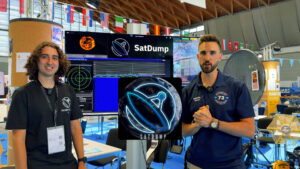
“Everything we just showed you is free—and there is no license needed to receive satellite data. You could sit in a cabin in the middle of Wyoming and still pull it down.” — Jacopo (IU1QPT), SatDump team (German Hamfest demo)
You don’t need a license to receive and decode publicly available, unencrypted satellite downlinks. That’s why SatDump draws crowds at hamfests: with a laptop, a budget SDR, and the right antenna, you can capture live weather imagery and fascinating telemetry straight from space.
⚠️ Legal note: Always follow local regulations. Receive-only of unencrypted public broadcasts is generally permitted; transmitting to satellites or decoding encrypted/proprietary services is not allowed.
What SatDump does—in plain English
SatDump is a free, cross-platform app that takes you from RF to images:
-
Tracks a pass and applies Doppler correction automatically.
-
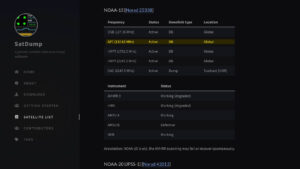
Demodulates and decodes NOAA APT / METEOR LRPT (~137 MHz), ISS SSTV, ATV feeds, and L-band HRPT/LRIT/HRIT (~1.69 GHz).
-
Exports PNG/GeoTIFF products suitable for mapping and analysis.
The team showed SatDump’s “Auto-Pipeline”: schedule passes, and the app records and decodes multiple satellites, choosing the best antenna source for each pass—hands-off processing during the demo.
Gear used at the demo (budget → better)
SDR receivers:
-
Entry: RTL-SDR USB dongle
-
Mid: Airspy / SDRplay
-
Advanced: HackRF / LimeSDR (wide-band work)
Antennas:
-
137 MHz (NOAA/METEOR polar): V-dipole, QFH, turnstile, or Lindenblad
-
1.69 GHz (GOES/HRIT/LRIT): small offset dish + L-band LNA/filter
-
The team also showed a compact, foldable L-band setup that fits in a backpack, then aims toward the satellite during the pass.
Extras: short low-loss coax, tripod/mast, pass-prediction, and stable laptop power.
Five-minute quick start
-
Install SatDump and pick your SDR in the GUI.
-
Choose a target: start with NOAA/METEOR around 137 MHz; pick a high-elevation pass.
-
Aim the antenna (vertical for 137 MHz; precise pointing for L-band dishes).
-
Record → decode: hit record; SatDump demods/decodes and assembles the imagery automatically.
-
Export outputs as PNG/GeoTIFF and share your map-calibrated results.
Starter frequencies (receive-only):
-
NOAA/METEOR APT/LRPT: 137.1–137.9 MHz (varies by bird)
-
GOES HRIT/LRIT: ~1.69 GHz (dish + L-band LNA/filter)
Interview highlights from German Hamfest

-
What signals can you decode? NOAA APT, METEOR LRPT on 137 MHz; ISS SSTV; ATV feeds; and L-band HRPT/LRIT/HRIT weather imagery.
-
Automation: the SatDump pipeline records and decodes multiple passes and switches to the best antenna for each pass automatically.
-
Open source & growing support: “We’re at 150–200 different downlinks supported,” said Alan (F4LAU), SatDump’s lead developer. The project is open-source; users can compile, test, and contribute via the website and GitHub.
-
Beginner path: Start with a 137 MHz antenna (even a simple dipole cut to length) and an RTL-SDR to receive NOAA-18/19/15 or METEOR. Upgrade later to L-band for HRPT/HRIT.
-
Community feedback: The devs actively welcome bug reports and feature requests—try the latest builds, then share your results.
Classroom & maker appeal
-
No license needed for receive-only public weather images.
-
Hands-on STEM: orbital mechanics, RF basics, and DSP.
-
Great for outreach: students watch Earth images appear live.
Troubleshooting cheatsheet
-
Noisy decode? Go outdoors, shorten coax, add an LNA/filter, and move away from USB noise.
-
Weak images? Wait for a higher-elevation pass, re-aim, adjust gain, verify polarization.
-
Doppler drift? Enable correction; tweak frequency mid-pass if needed.
-
Indoors? 137 MHz may work near a window; L-band almost always needs an outdoor dish.
FAQs
- Do I really not need a license?
For receive-only of unencrypted, public downlinks, many regions do not require a license. Always follow your local laws. - Can I decode satellites indoors?
Sometimes at 137 MHz by a window; L-band dish work is typically outdoors. - What’s the lowest-cost setup?
An RTL-SDR, a simple 137 MHz antenna (V-dipole/QFH), and a laptop. Add an LNA/filter for better results. - Which antenna should I build first?
For polar orbiters, build a V-dipole or QFH. For GOES HRIT/LRIT, use a small dish with an L-band LNA/filter. - Can I transmit to satellites later?
Yes—but transmitting requires an amateur license and the right equipment.
Keep learning with Ham Radio Prep
Ready to go from receive-only to full amateur satellite operations?
-
Get licensed: Start your free lesson at hamradioprep.com
-
Study antennas: Ham Radio Antennas
-
Ready to go beyond receive-only? Enroll in our Satellite & Space Operations course for hands-on labs covering SatDump workflows, pass prediction, Doppler, 137 MHz and L-band antennas, and real decoding exercises (NOAA, METEOR, GOES, ISS SSTV).