Welcome to lesson 15. In this lesson, we’ll talk more about station equipment and troubleshooting some common problems with your equipment.
Station Equipment
A ham radio has two main jobs: to transmit your signals, and to receive signals from other stations.
In the early days of radio, the transmitter and receiver were two separate units. But today in ham radio, we primarily use transceivers.
A transceiver is a device that combines a receiver and a transmitter into one unit.
You can remember this just by looking at the word:
- Trans is for transmit
- Ceiver is for receiver.
Almost all of the common radios, both handhelds and base station radios, are transceivers.
One of the key components of a transceiver is the Variable Frequency Oscillator or VFO circuit, which is used to set the receive and transmit frequency. We usually just call this the VFO. On my IC-7300 HF radio, this big knob on the front is the VFO knob used to control the frequency.
Receiving
Sensitivity & Selectivity
A good ham radio receiver needs to be able to hear the signals you’re trying to receive, but also block out signals you don’t want to receive that would cause interference and noise. The terms for these two aspects of receiver performance are sensitivity and selectivity.
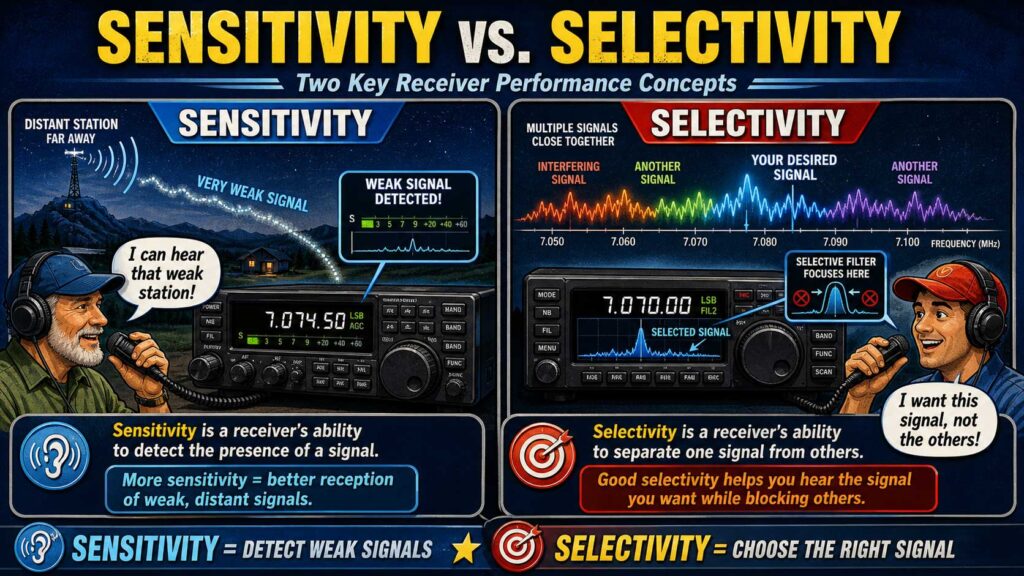
Sensitivity describes the ability of a receiver to detect the presence of a signal.
The more sensitive the receiver is, the better the radio can pick up very weak, distant signals.
Selectivity describes the ability of a receiver to discriminate between multiple signals.
Selectivity is important to make sure you select the correct signals you want to hear while blocking out the other signals.
Don’t get these two terms mixed up:
- Sensitivity means ability to detect a signal
- Selectivity means ability to discriminate between multiple signals
Transmitting
When a radio is turned on, it defaults to receive mode. To transmit, you usually use the PTT function, which stands for push-to-talk. Usually, this button is on the microphone.
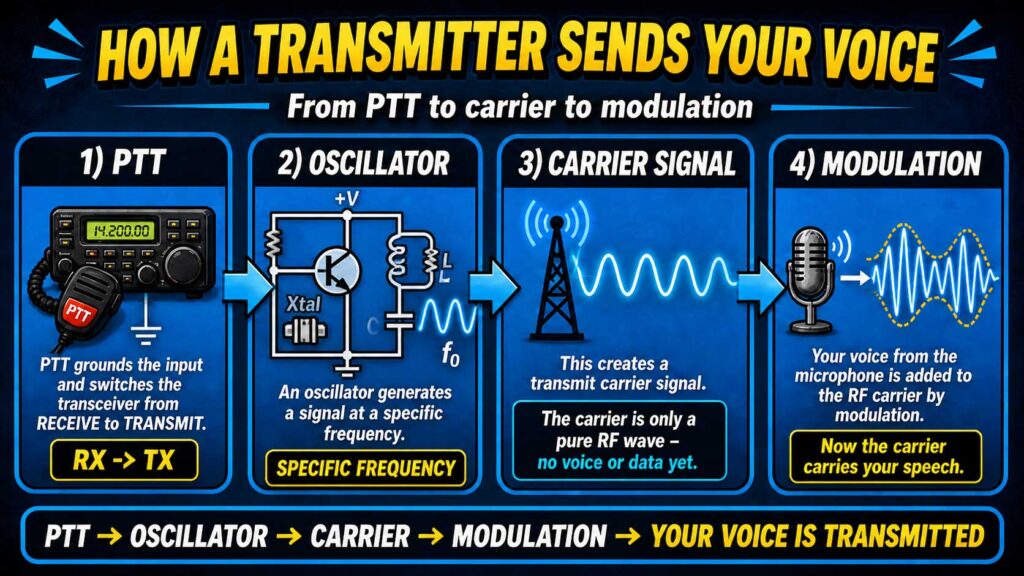
The PTT input switches transceiver from receive to transmit when grounded.
When transmitting, the transmitter uses an oscillator circuit to generate a signal at a specific frequency.
This will create a transmit carrier signal. The carrier signal acts like a transporter for your data, but by itself, it doesn’t have any information or voice. It’s just a pure, electromagnetic wave at a particular frequency.
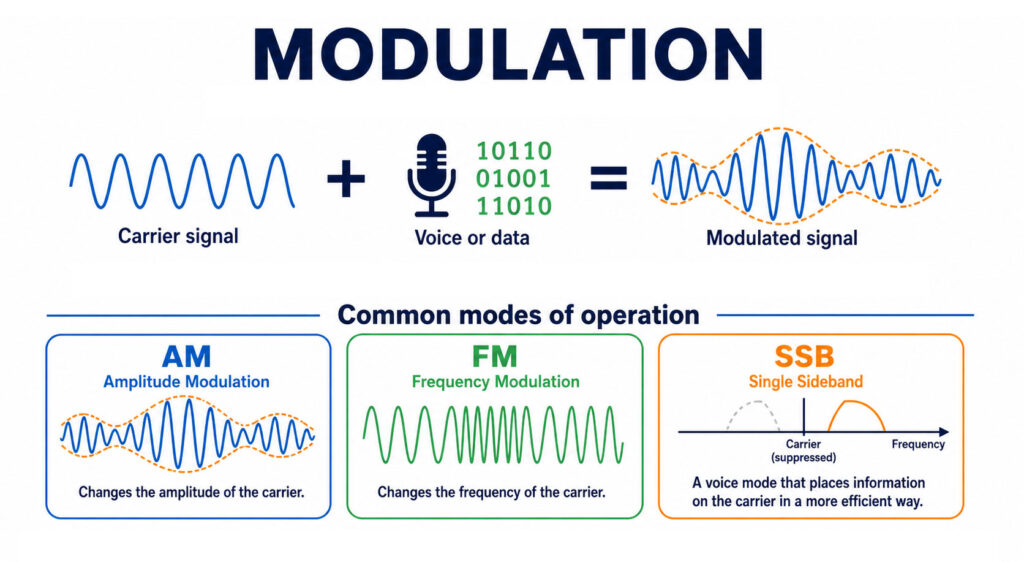
Then, when you speak into the microphone, your transmitter uses a technique called modulation to combine speech with an RF carrier signal.
Modulation is the process of adding your voice or other data on top of the carrier signal. The different modes of operation, like FM, meaning frequency modulation, AM, amplitude modulation, and SSB, are all different ways of adding data on top of the carrier frequency.
Amplifiers
Most handheld ham radios have a maximum power output of 5 – 8 watts, and most full-size HF ham radios have a maximum power of 100 watts from the factory.
But there are cases where you may want to increase your power output, like if you want to make contacts with very distant stations, operate in difficult conditions, or maybe you’re in a contest.
You can add an RF power amplifier to the output of a transceiver to increase the transmitted output power.
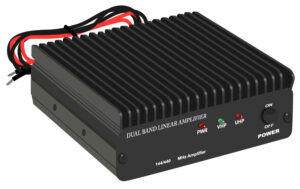
Some VHF power amplifiers have a switch that selects either SSB or CW-FM. The function of this switch is to set the amplifier for proper operation in the selected mode. This function does NOT change the mode of the transmitted signal – that transmitted mode is set on the radio itself, not the amplifier.
Mixers
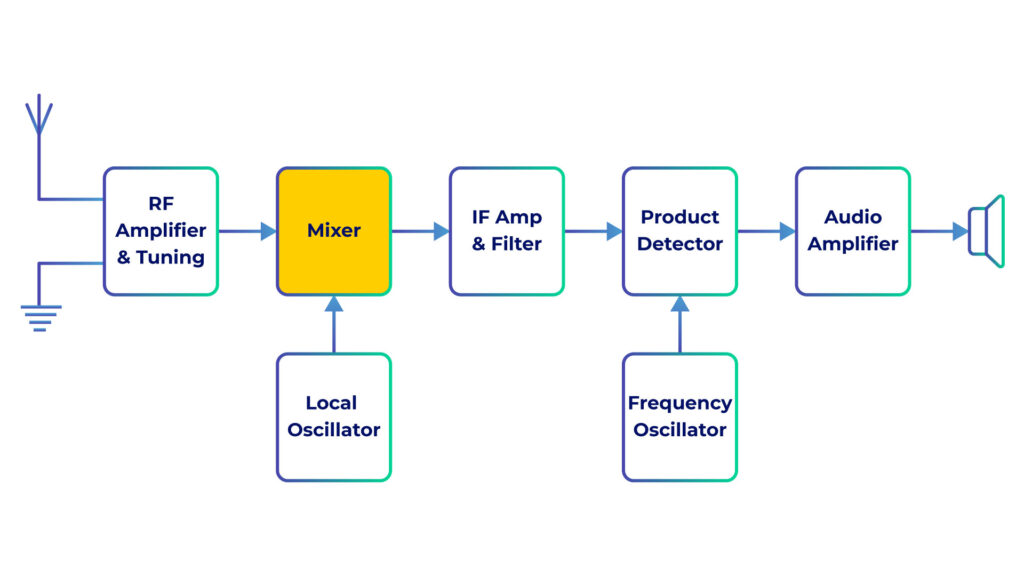
A mixer is a component used to convert a signal from one frequency to another. Mixers are used internally in your transceiver to convert signals that you want to transmit or receive into frequencies needed by your radio’s internal circuits.
Transverters
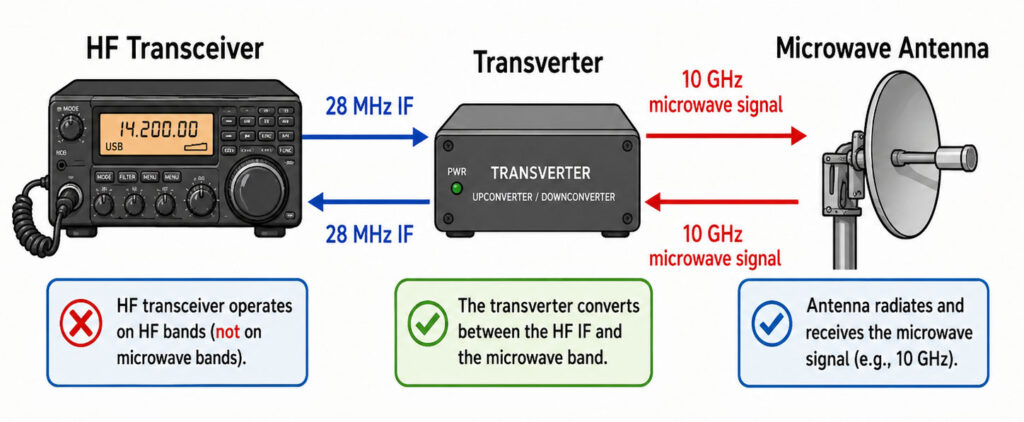
A transverter is a device that converts the RF input and output of a transceiver to another band.
You can use a transverter to operate your radio on bands it doesn’t support natively.
For example, a transverter could help an HF-only radio operate in the microwave spectrum, since microwave radios can be very expensive.
Noise & Distortion from Equipment
Let’s discuss some common transceiver problems and how to fix them.
If you are told your FM handheld or mobile transceiver is over-deviating, you can talk farther away from the microphone. That’s because if you speak too loudly, it can cause the radio to swing its frequency too wide. Usually speaking, a couple of inches away from the microphone with a strong speaking voice is perfect.
If you receive a report that your audio signal through an FM repeater is distorted or unintelligible, there are several possible causes:
- Your transmitter is slightly off frequency
- You are speaking too loudly or too close to the microphone,
- Or you are in a bad location
All of these choices are correct.
Another common cause of distortion is RF feedback, where your transmission is picked up by your microphone cable and travels back into the transmitter, creating a feedback loop.
You can eliminate this by adding a clip-on ferrite “choke” to the microphone cable to prevent the transmitted signal from feedback back into the transmitter.
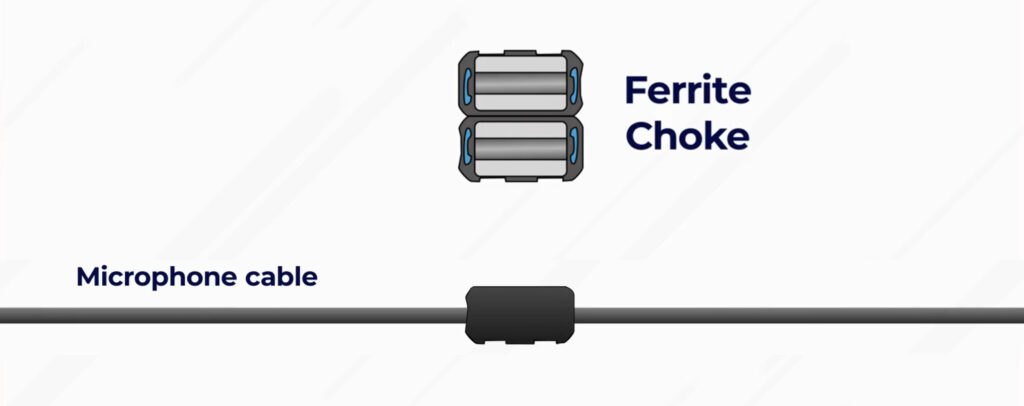
The keyword here is ferrite choke. Ferrite chokes are simple, affordable devices you can add to cables to reduce noise and interference by preventing unwanted current on the outside of your cables.
Interference
Interference is a common problem in the world of amateur radio, and it can come from natural or manmade sources. You should use best practices to avoid interfering with other stations, and there are also techniques you can learn to filter out and avoid interference with your own station.
There are many things that can interference:
- Fundamental overload, when a receiver is overwhelmed by a very strong signal
- Harmonics, where your operating frequency accidentally creates a harmonic at a different frequency
- And Spurious emissions, which are unwanted signals emitted from your radio, are caused by problems with your transmitter
All of these answers are correct when asked what can cause radio frequency interference on the exam.
Interference with AM/FM Broadcast Stations
Ham radios do not operate on the same frequencies as AM/FM broadcast radio or commercial radios – the frequency spectrum is divided into different uses so that we can also use the radio waves effectively.
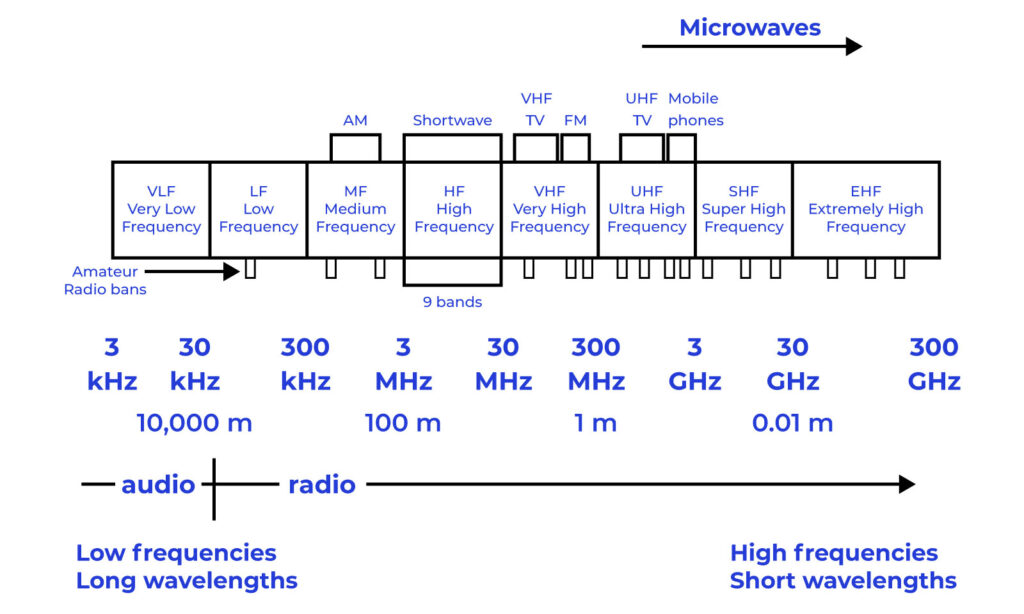
But there are some scenarios where interference could occur between different radio services.
It’s possible that an AM/FM radio might unintentionally pick up a ham radio transmission, even though it should only be receiving AM/FM broadcast frequencies.
This is usually because the receiver is unable to reject strong signals outside the AM or FM band. When working properly, an AM/FM broadcast radio should reject any signals outside the AM or FM broadcast band, and it should not pick up amateur radio transmissions.
It’s also possible that your ham radio receiver could receive interference from a nearby commercial FM station.
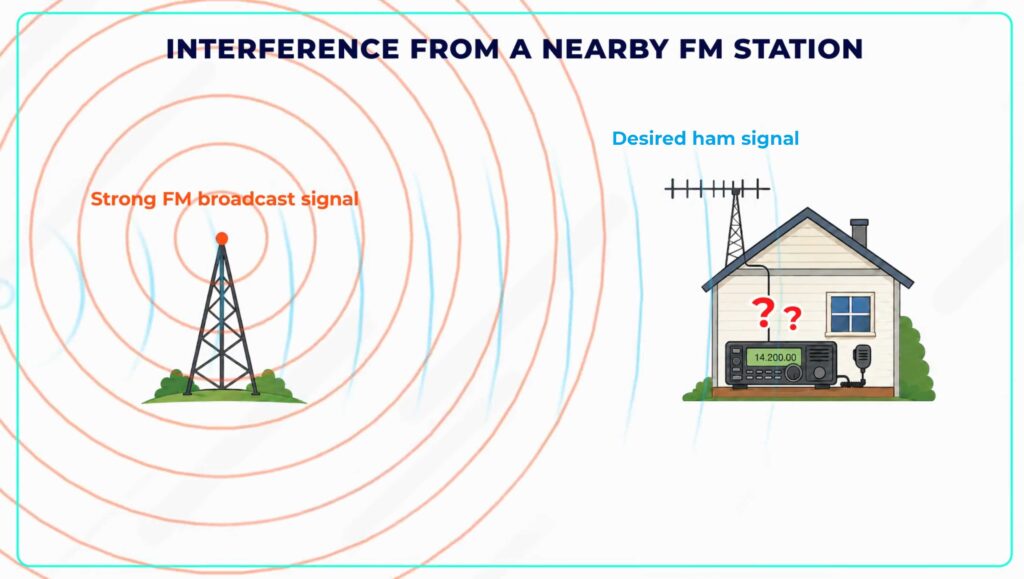
If a nearby commercial FM station is causing interference to a 2-meter band transceiver, you can reduce interference by installing a band-reject filter. A band reject filter will block the commercial frequencies while letting the amateur radio frequencies through.
Interference with Neighbors
It’s important as a ham radio operator to use best practices to avoid interference with your neighbors.
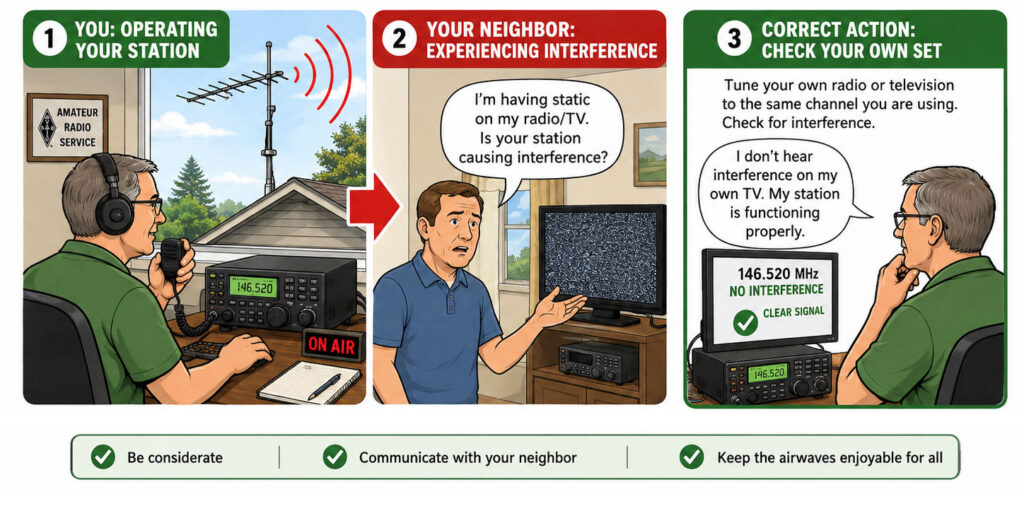
If a neighbor tells you that your station’s transmissions are interfering with their radio or TV reception, you should make sure that your station is functioning properly and that it does not cause interference to your own radio or television when it is tuned to the same channel. Checking your own radio and television for interference first is a good common-sense action to help you identify possible problems with your station.
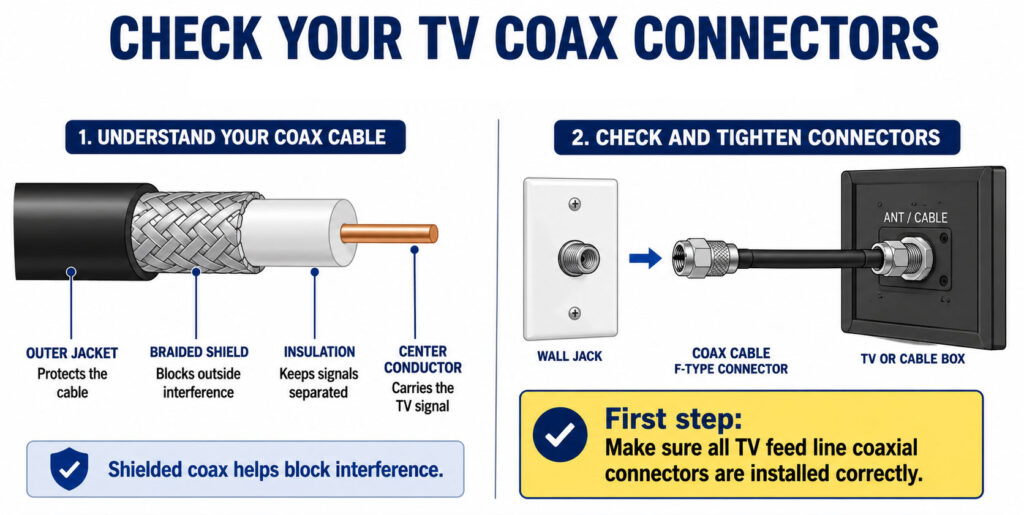
If your amateur radio station is causing interference with a non-fiber optic cable TV, what should be your first step to remove the interference?
Cable TV uses shielded coax to keep interference out. The very first step should be the simplest and most likely point of failure – you should be sure all TV feed line coaxial connectors are installed correctly. If a connector is loose or not properly connected, it can cause a leak in the cable that allows your amateur radio signal to enter. Checking the connectors is the first and most common-sense check before spending money on filters.
Some old TV or FM radio antennas might accidentally pick up ham radio signals, because the antenna isn’t selective enough to filter out the amateur radio frequencies. One way to reduce the interference by an amateur station to a non-amateur station is to block the amateur signal with a filter at the antenna input of the affected receiver. The filter will block the amateur radio signal before it enters the receiver and causes interference.
Interference with Your Station
Those are some ways to prevent your station from interfering with other devices. But what if something in your neighbor’s house is interfering with your ham radio station?
The good news is that FCC rules prohibit the use of devices that cause interference, so there are several things you can do:
- Work with your neighbor to identify the offending device
- Politely inform your neighbor that FCC rules prohibit the use of devices that cause interference
- Make sure that your station meets the standards of good amateur practice
All of these choices are correct when the exam asks what to do if something in a neighbor’s home is causing interference with your station.
Lesson Recap
Let’s recap. In this lesson, you learned that modern radios usually combine transmitters and receivers into a single unit called the transceiver, and that the VFO is used to set the frequency.
You learned that sensitivity is the ability of a receiver to detect a signal, while selectivity is the ability to discriminate between different signals.
We discussed how pushing the PTT button changes the radio from receive to transmit, using an oscillator to create a carrier frequency, and then using modulation to add speech on top of the carrier frequency.
We talked about using an amplifier to increase RF power output, a mixer to convert a signal from one frequency to another, and a transverter to change the RF input and output, allowing you to operate on a different band completely.
You learned techniques for preventing noise and distortion, such as talking further away from the microphone if you’re over-deviating or adding ferrite chokes.
And finally, you learned how to avoid interference with other devices – first with common sense steps like making sure your station is working properly and checking the coax connectors are installed correctly, or by installing band-reject filters to block unwanted signals.